Skip to content
GEPCO Bill Check by CNIC: Does It Work in 2026?
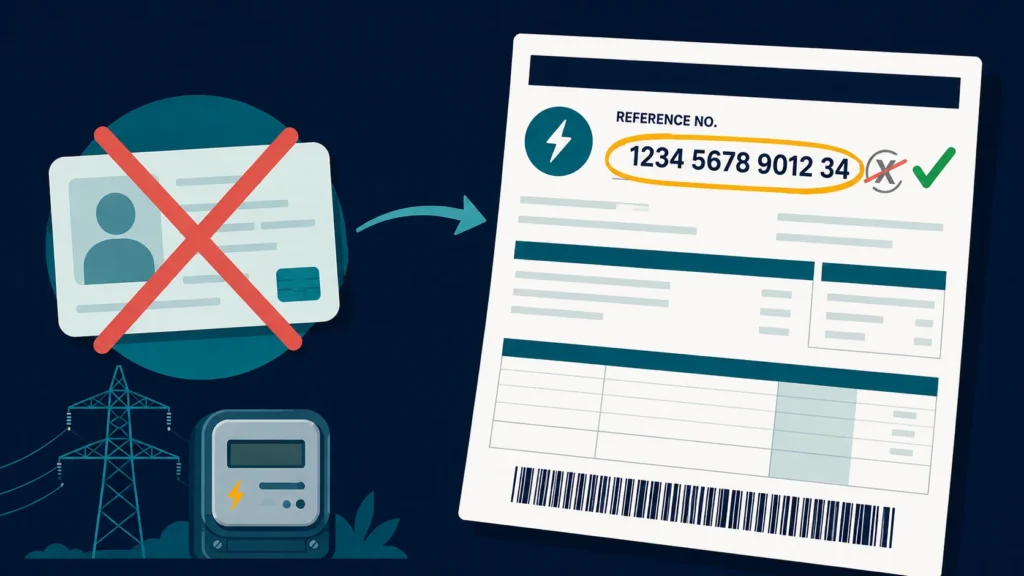
Short answer: GEPCO has no CNIC-based bill lookup. Not on the official PITC billing portal, and not on any tool that pulls from it. What you need is the 14-digit reference number printed on your bill. Some forms also accept the customer ID. A CNIC will only help you in person, at a GEPCO sub-division office, where a staff member can search the connection for you.
That gap between “online” and “in person” is the whole answer, and most people never get told it. This guide covers the number that does work, how to recover it when every old bill is gone, and why you should be careful with any site that asks for your CNIC.
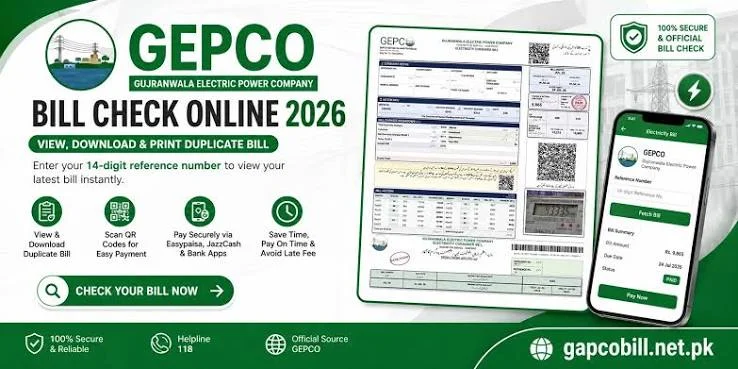
Check your bill now: enter your reference number on the GEPCO bill check tool and your current bill, due date and downloadable copy load in seconds.
The one number that actually works
Your reference number sits in the top section of every GEPCO bill, printed or PDF, labelled “Reference No.” It is 14 digits, and it stays the same for the life of the connection.
Two rules when you type it in:
- No spaces and no dashes. The lookup is exact match, so a single stray character returns nothing.
- Drop the trailing letter. Some GEPCO bills print a “U” or an “R” at the end of the reference number. That letter is not one of the 14 digits. Leaving it in is one of the most common reasons a search fails while the number itself is perfectly correct.
If you count 14 digits and it still fails, the problem is almost always the customer ID being used by mistake. More on that below.
Why GEPCO has no CNIC lookup
This is not an oversight, and no third-party tool can add it. Three structural reasons:
Bills belong to connections, not people. The billing database is keyed on the reference number, the customer ID and the meter number. Your CNIC may appear in the original connection file, but it is not an index the billing system searches on.
One CNIC can hold several connections. A house, a shop, a tube well and a family property can all sit under one identity number. A public search would return a pile of accounts with no safe way to tell them apart on an open page.
Most occupants are not the registered owner. Tenants across Gujranwala, Sialkot and Gujrat routinely pay bills for connections still registered to a landlord or a previous owner. A CNIC search would fail for exactly the people who need it most.
Add privacy to that list. A public CNIC-to-bill lookup would expose a stranger’s address, consumption pattern and payment history to anyone holding their identity number.
Reference number vs customer ID
These two get mixed up constantly, and some GEPCO-related sites use them as if they were the same thing. They are not.
| Reference number | Customer ID / Consumer ID | |
|---|---|---|
| Length | 14 digits | Shorter |
| Printed as | “Reference No.” | “Customer ID” or “Consumer ID” |
| Used for | Online bill check, duplicate bill download, payment | Account-level matters at the GEPCO office |
| Trailing U or R | Sometimes printed, not part of the number | Not applicable |
| Changes over time | No | No |
If a form asks specifically for the reference number, do not paste the customer ID into that field. It will fail every single time, and it looks exactly like a system outage when it is not.
You lost every copy of the bill. Now what?
Work down this list. The first four cost you nothing but a few minutes.
1. Any older bill. The reference number is identical on every bill for that connection, so a bill from last year works just as well as last month’s.
2. The demand notice or connection agreement. When the meter was installed, the paperwork was issued with the same reference number printed on it. Check the file with the property documents.
3. Old messages. If the connection was ever registered for e-bill alerts, or a shopkeeper or bank once sent a screenshot of the bill, the number is sitting in your SMS, email or WhatsApp.
4. A paid receipt. Bank and wallet payment receipts usually carry the reference number, since that is what the payment was posted against.
5. Your GEPCO sub-division office. This is where your CNIC finally earns its place. Staff can locate the connection against your name, the property address, or the meter number, and hand you the reference number.
What to take to the sub-division office
- Your CNIC
- The full property address, including the nearest landmark
- The meter number, read straight off the meter body
- Any old bill or connection paperwork, even a partial one
- If the connection is not in your name, whatever proves your link to the property, such as a tenancy agreement
Going with the meter number in hand is the single biggest time saver. It narrows the search to one connection instead of a name that may match dozens.
Can you check a GEPCO bill with a meter number instead?
Not through the online tools. The meter number is what the meter reader records and what the office searches on, but the public bill lookup does not index by it. Same answer for name, address and phone number.
Online, only the reference number works, and on some forms the customer ID. Offline, the office can search on almost anything you bring them.
About sites promising “GEPCO bill check by CNIC”
Some of these are harmless. The page is titled for the query people actually type, but the form on it still asks for a reference number. Mislabelled, not malicious.
Others deserve real caution. If a page asks for your CNIC and then claims to show your bill, ask where that data came from, because the billing system did not provide it. Never enter your CNIC alongside your mobile number, date of birth, or any payment detail on a site you do not recognise.
The test is simple. A legitimate bill check asks for one thing, the reference number, and returns your bill. Anything more than that is collecting information it does not need.
How to check your GEPCO bill online, step by step
- Find the 14-digit reference number on any previous bill.
- Open a bill-checking tool such as GEPCO Bill Check.
- Type all 14 digits, no spaces, no dashes, no trailing U or R.
- Press Check Bill.
- The current bill opens with the amount, due date, billing month and units consumed.
- Use the download option to save the duplicate bill as a PDF for payment or printing.
A brand-new connection may not appear yet. New meters typically take one to two billing cycles before they show up in the online system, and that is normal rather than a fault.
Bill not found: run through this in order
- Recount the digits. Exactly 14.
- Remove the trailing U or R if your bill prints one.
- Confirm you used the reference number and not the customer ID.
- Check whether the connection is new and has not been billed yet.
- Wait a short while and retry, since the billing portal occasionally goes down for maintenance.
- Still stuck? Take the bill or connection paperwork to your sub-division office.
The full version of this checklist lives on the bill not found section of our main guide.
Where GEPCO operates
GEPCO supplies electricity across six districts of northern Punjab: Gujranwala, Sialkot, Gujrat, Hafizabad, Narowal and Mandi Bahauddin.
If your bill is not appearing under GEPCO and you are outside these districts, check the company name printed at the top of your paper bill. You are probably served by another DISCO, such as LESCO for Lahore or FESCO for Faisalabad, and you will need that company’s tool instead.
Getting help from GEPCO
| Channel | Detail |
|---|---|
| Universal helpline | 118, routed to the complaint centre covering your area |
| In person | Your local GEPCO sub-division office, written complaints accepted |
| Escalation | NEPRA, the sector regulator, through its consumer complaint system |
Keep your reference number ready when you call, since it is how the operator locates your connection. If a complaint is not resolved through GEPCO within a reasonable time, NEPRA is the outside body that takes it further.
Frequently asked questions
Can I check my GEPCO bill using my CNIC? No. The online bill check requires the 14-digit reference number, or on some forms the customer ID. CNIC lookup is not supported.
Can a GEPCO office find my reference number from my CNIC? Yes. In person, staff can search the connection against your CNIC, the property address, or the meter number. There is no online equivalent of that search.
My reference number ends in U or R. Do I include it? No. Only the 14 numeric digits are used. The letter is printed on the bill but is not part of the number you enter.
Can I check a GEPCO bill with a meter number? Not online. The meter number is useful at the sub-division office, but the public bill-check tools do not search on it.
Is checking my GEPCO bill online free? Yes. Checking and downloading your bill costs nothing, on the official portal or on any accurate tool built on it.
How often does the bill update online? The current month’s bill appears once GEPCO finalizes the meter reading and billing cycle for your area, usually once a month. Payment status can take a few days to reflect after you pay.
Ready to check? Enter your 14-digit reference number on the GEPCO Bill Check tool and your bill loads in seconds, free.
Disclaimer: GEPCOCheckBill.com.pk is an independent, informational guide and is not affiliated with, endorsed by, or operated by the Gujranwala Electric Power Company (GEPCO) or PITC. All bill data displayed comes directly from the official billing records. This site does not generate, alter, or process payments.
Practical checklist for GEPCO Bill Check by CNIC: Does It Work in 2026?
Before you finish this task, write down the bill month, reference number, current reading, previous reading, units, due date and payable amount. Keeping these fields together helps you explain the issue in one message and gives the office a useful starting point. If you are checking a bill for a family member or tenant, confirm who is responsible for the connection and keep the account holder informed.
Make a month-by-month record rather than relying on memory. A simple note can include the reading date, meter photograph, units consumed, payment date, receipt number and any complaint number. When a value changes, describe the change in plain language: for example, the reading is estimated, the units are higher than the meter record, or an adjustment appears for the first time. Clear facts are more useful than an accusation.
How to compare two GEPCO bills
Place the current and previous copies side by side. First compare the billing period and reading dates. Next compare units, tariff category, fixed charges, fuel or quarterly adjustments, taxes, arrears and the final payable amount. A total can rise even when one line decreases because several components are calculated separately. Mark each changed line and keep a short explanation beside it.
If the bill is being checked on a mobile phone, zoom in before reading small numbers and download the file instead of relying on a temporary screen. If you print it, choose a readable scale and keep the first page with the reference number. Never send a cropped image that removes the billing month or account details when asking for official help.
When to contact GEPCO
Contact the relevant official route when the account details are wrong, the meter reading is clearly inconsistent, a payment is not reflected, a duplicate bill cannot be retrieved, or a service request has passed its stated follow-up time. Include the exact field in question, the evidence you have, and the action you want: correction, confirmation, duplicate copy or status update. Save the response and the complaint number.
Tariffs, taxes, adjustment rules and office procedures can change. Use the current information published by GEPCO for the final decision, especially before paying an unusual amount or submitting identity documents. This article explains a checking method; it does not replace an official bill, tariff notification or written response from the distribution company.
Short answer for search and voice queries
To check a GEPCO bill, use the exact reference number on the bill through the official lookup route, review the billing month, readings, units, charges, taxes, due date and payable amount, then save a copy. If a field is wrong, photograph the meter or receipt, keep the bill and contact the correct GEPCO subdivision with a complaint reference.
Related GEPCO guides
Use these related guides to compare your bill, keep the right records and choose the correct next step:
Check your GEPCO bill in seconds
Enter your 14-digit reference number and your current bill, due date and downloadable copy load right away.
Disclaimer: GEPCOCheckBill.com.pk is an independent, informational guide and is not affiliated with, endorsed by, or operated by the Gujranwala Electric Power Company (GEPCO) or PITC. All bill data displayed comes directly from the official billing records. This site does not generate, alter, or process payments.